 Graph-It-Live
See your codebase
as a graph
Imports, symbols, cross-file calls, cycles, dead code and change impact — analyzed locally and returned as evidence. In VS Code, in your terminal, and inside your AI assistant.
Runs locallyOpen sourceVS Code · CLI · MCP






From file imports down to a single call
The same indexed graph powers navigation, review, codemaps, and the context you hand to an AI assistant.
File graph
Which files import this file? What depends on this module? Regex and AST parsing across the whole workspace, with cycle detection.
Symbol view
Drill into a file to see functions, classes, outgoing calls, incoming callers and recursion. Click a symbol to jump to its definition.
Live call graph
Cross-file symbol relationships in a Cytoscape.js panel. Expand callers and callees up to depth 5, group by folder, highlight recursion.
Answers, not file dumps
Every result points back to real code: a file, a symbol, a line.
See the architecture, layer by layer
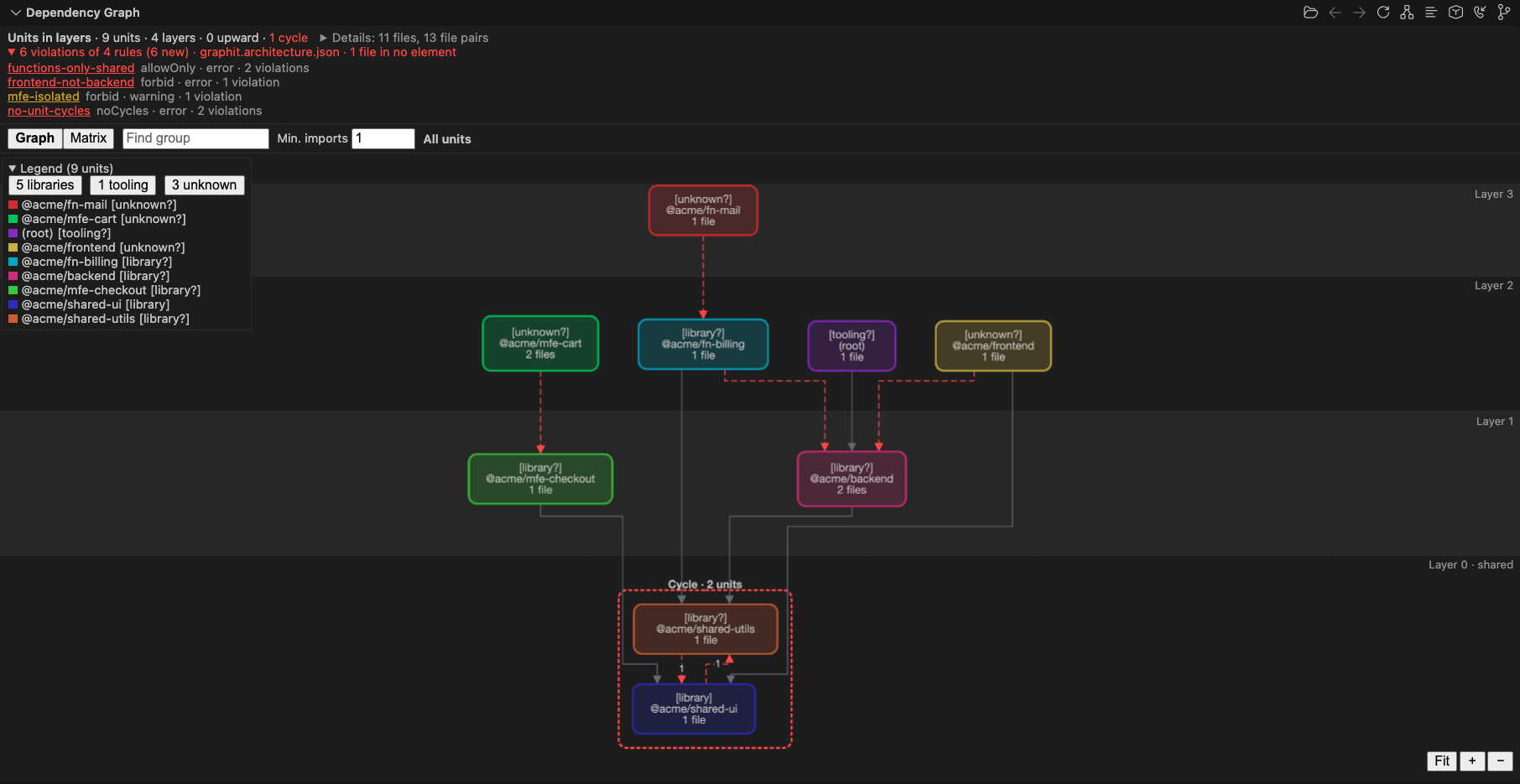
The Architecture view draws your packages (or top-level folders) as units in layers, with their roles, cycles and the import edges between them. Open it with Switch to Architecture View in the Dependency Graph title bar.
- Double-click a unit to walk down its folders, breadcrumb to come back
- Click an edge for the exact file pairs behind it
- Dependency structure matrix with
Ca/Ce · Iper row - Dependents by group for any unit, group or file
Write the rules, catch every break
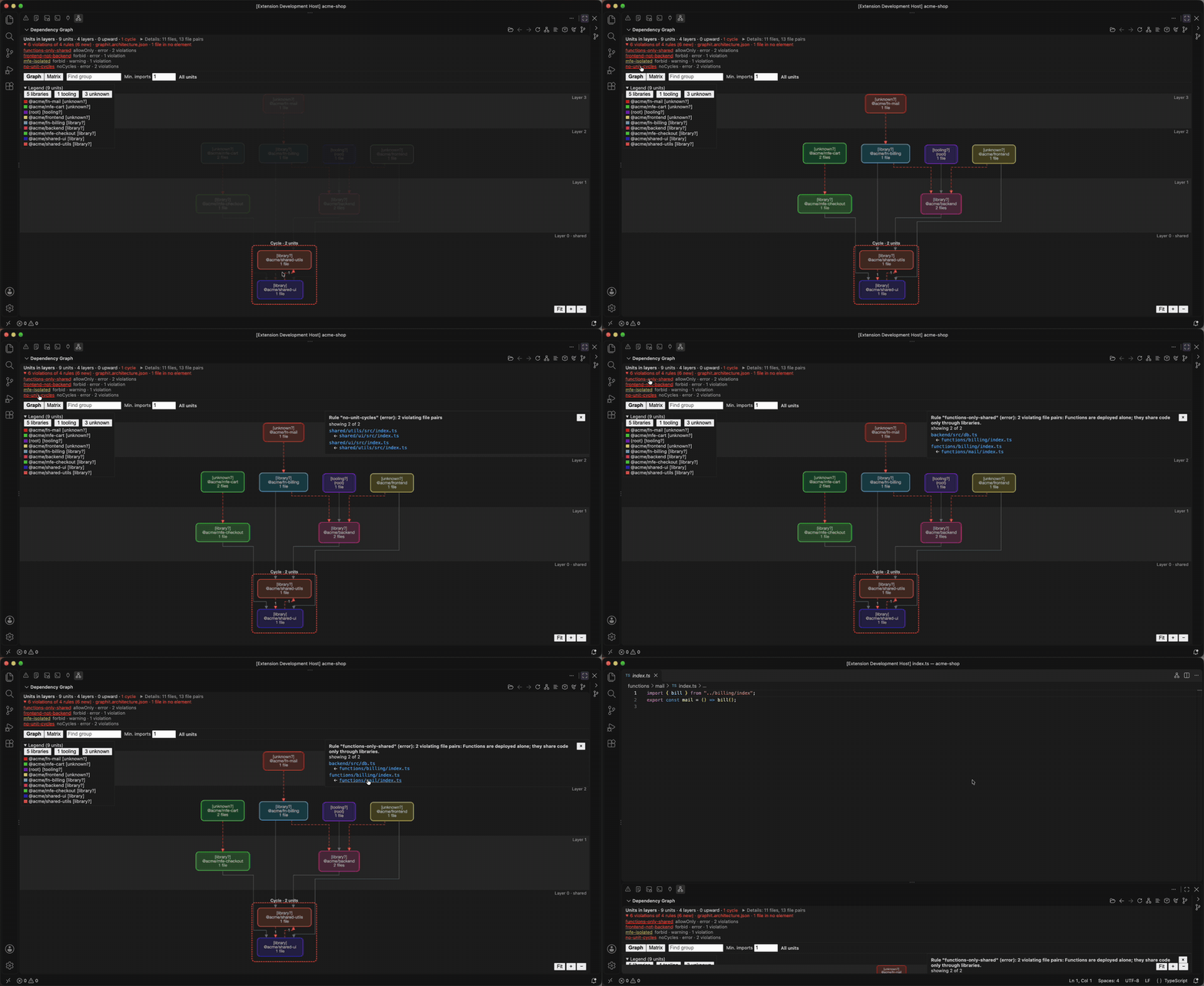
Declare layers and boundaries in graphit.architecture.json. The view lists each rule with its violations, and graph-it check-architecture fails CI on a new one, with SARIF for code scanning.
forbid,allowOnlyandnoCyclesrules- Elements by path, package name or unit role
- Baseline to adopt rules on an existing codebase
check_architectureMCP tool for your assistant
Drill down into any file
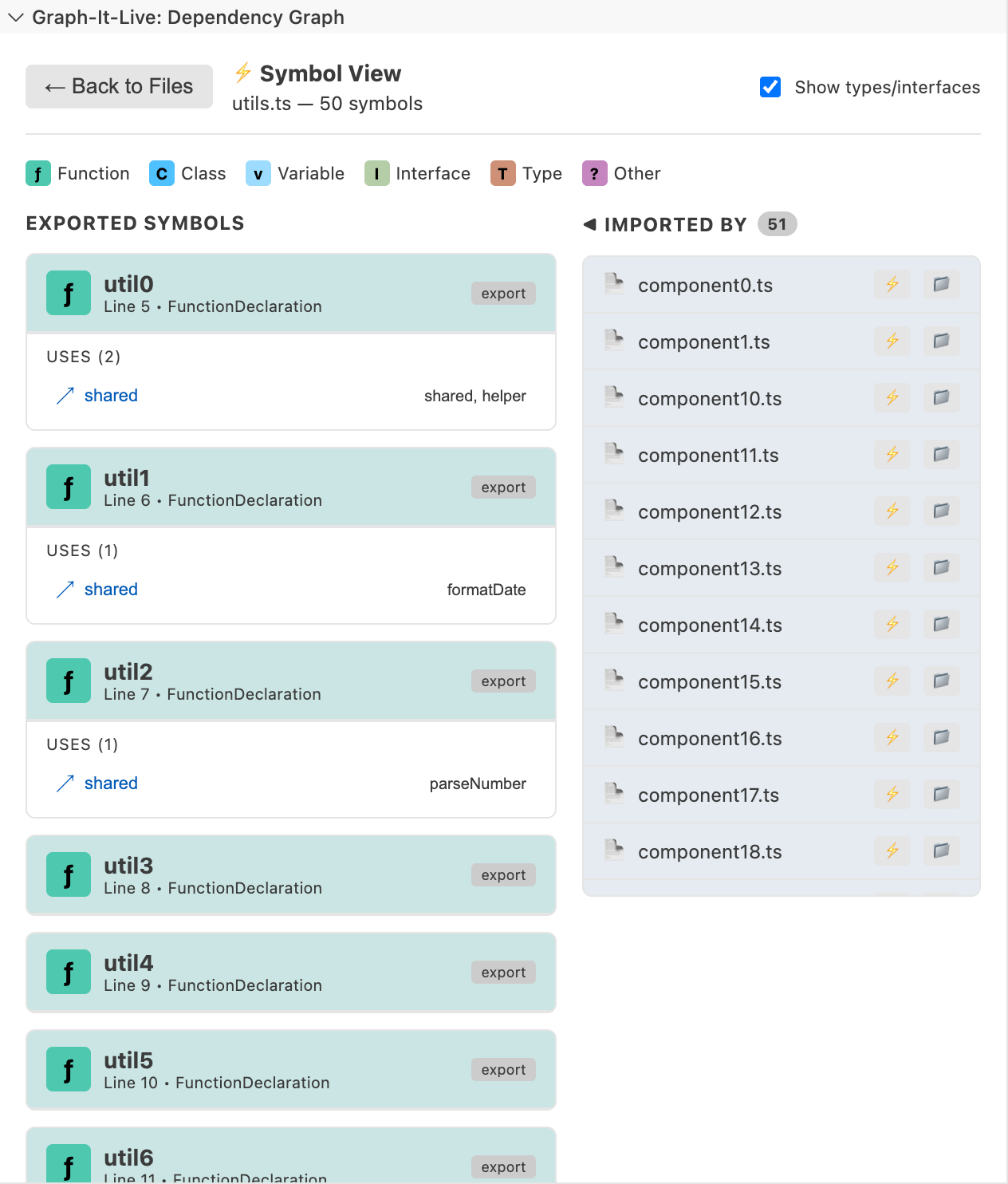
Symbol View turns a file into its own little graph — exports, internals, and who calls what.
- Functions, classes and variables with export status
- Outgoing calls and incoming callers side by side
- Self-recursion and mutual recursion highlighted
- Hierarchical, force-directed or radial layout
Follow calls across files
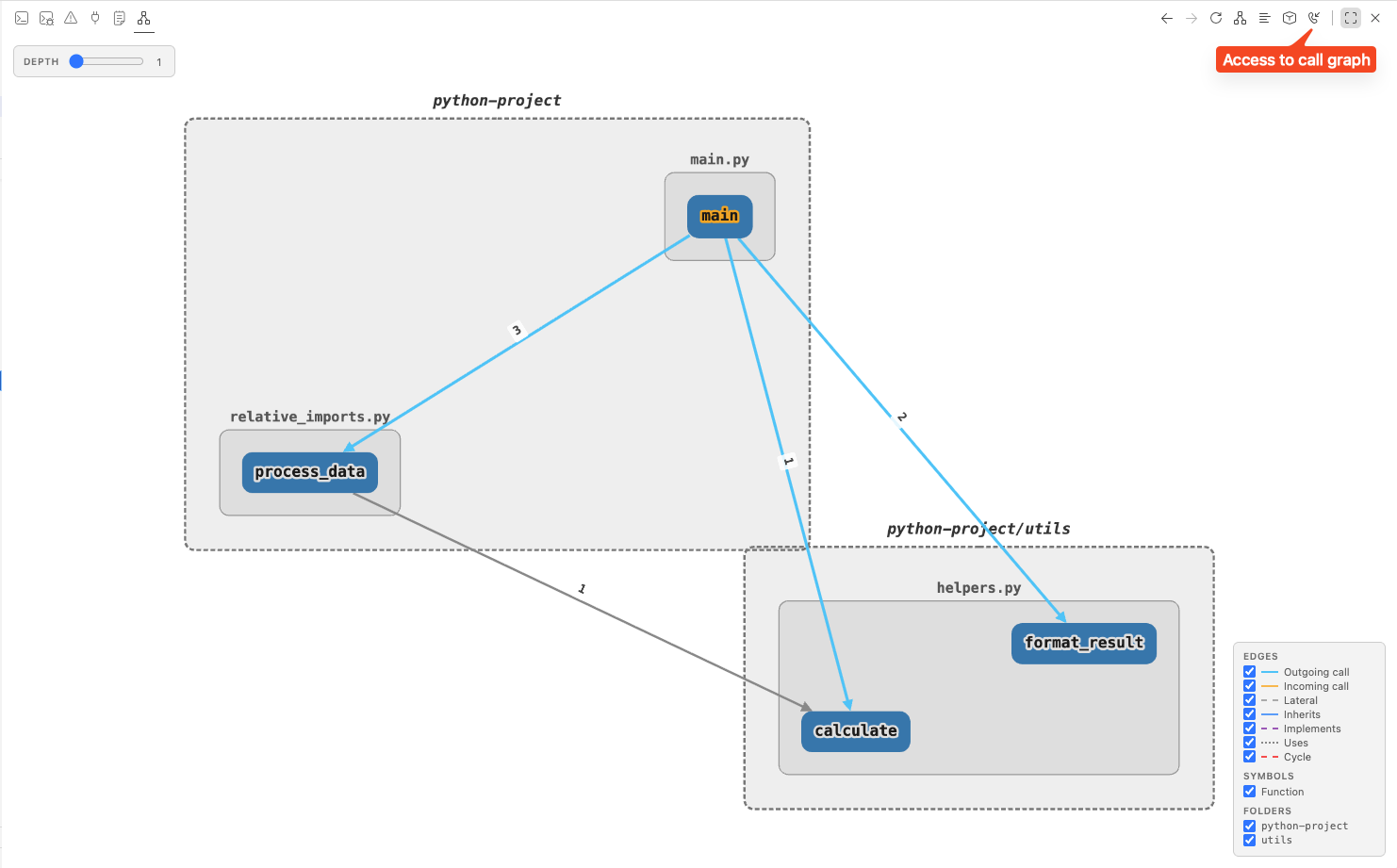
The Live Call Graph is built with Tree-sitter and SQLite, and refreshes after you save.
- Expand callers and callees with depth 1 to 5
- Calls numbered in invocation order
- Filter by symbol type or folder
- TypeScript, JavaScript, Vue, Svelte, Python, Rust, C#, Go, Java
Find what nobody uses
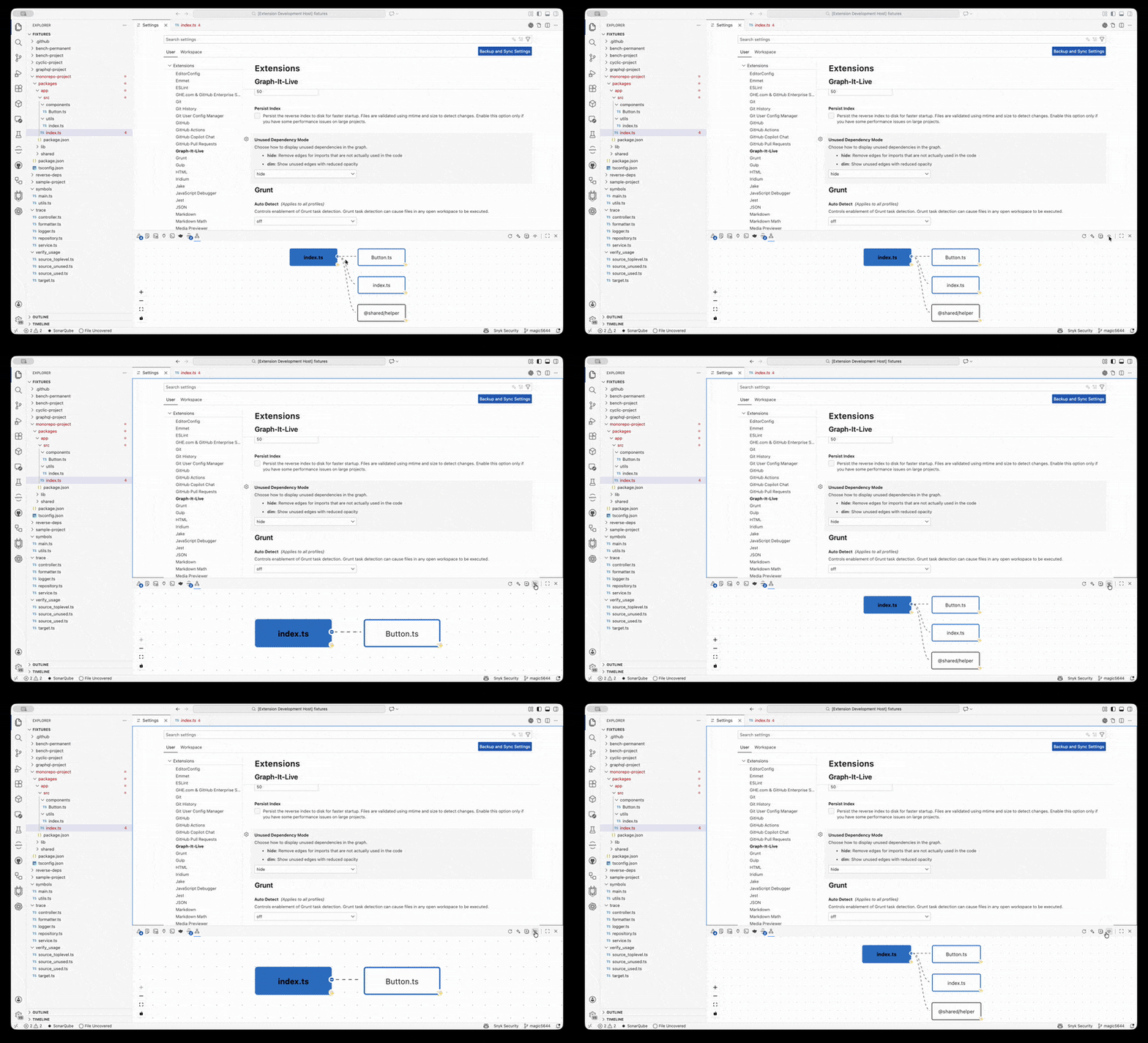
Hide or dim unused dependencies, then hunt unused exported symbols and dead files before a refactor.
- Unused dependency filter: hide or dim mode
- Unused exported symbol detection
- Execution trace from any function
- Callers affected by a signature change
Give your assistant a map, not a haystack
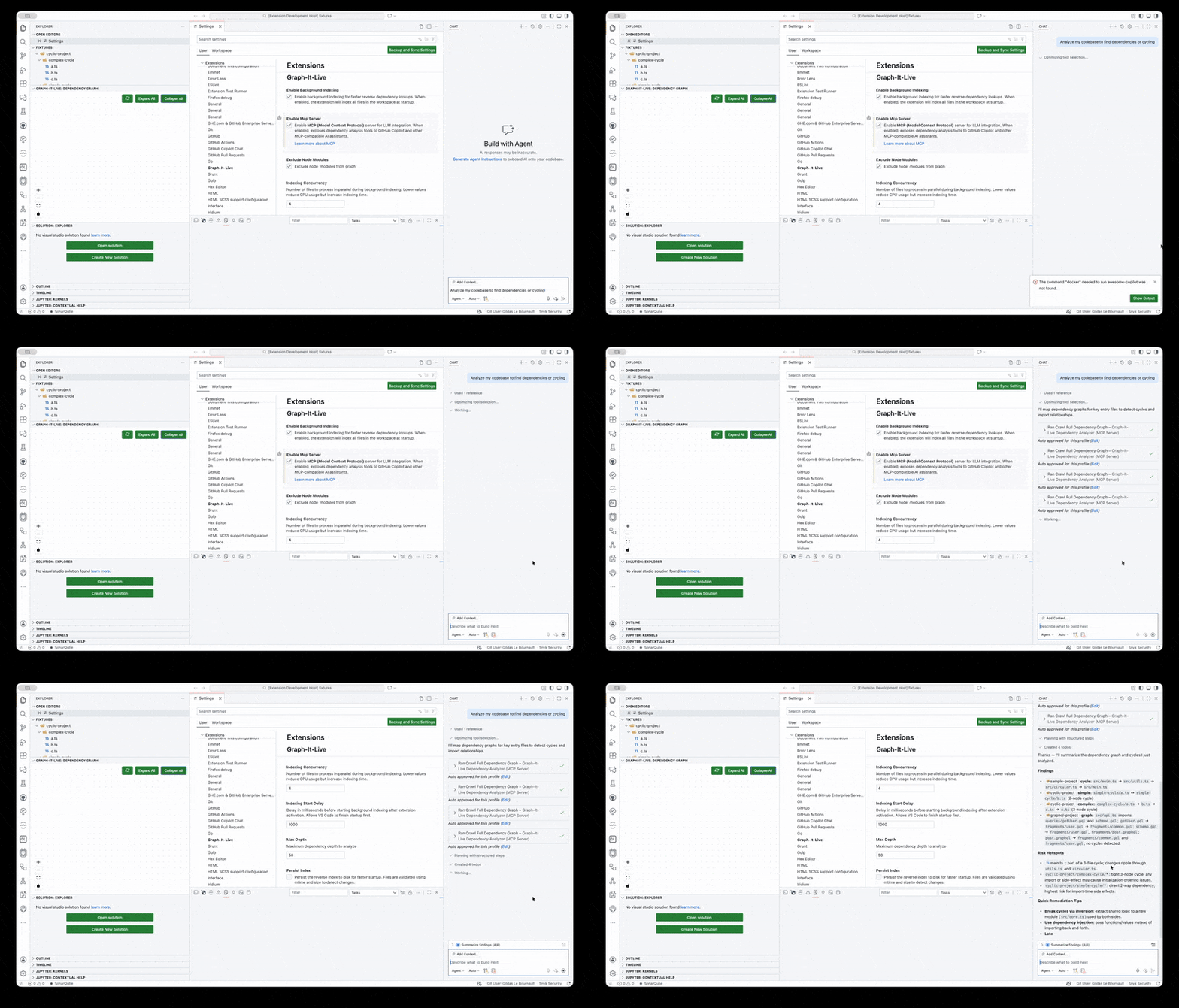
24 MCP tools expose the same local graph to GitHub Copilot, Claude, Cursor, Windsurf, Antigravity and any MCP client.
Explore all 24 MCP tools
These are the names advertised by graph-it serve. Start with graphitlive_graph_context for an open-ended question; choose a specialized tool for a specific task.
| MCP tool | Purpose |
|---|---|
graphitlive_graph_context | Bounded unified context: search, neighbors, path, impact, refactor and overview. |
graphitlive_analyze_dependencies | Import/export statements with written specifiers and resolved paths. |
graphitlive_crawl_dependency_graph | Transitive file dependencies and circular imports. |
graphitlive_find_referencing_files | Files that import or reference a target file. |
graphitlive_verify_dependency_usage | Whether an imported file's symbols are actually used. |
graphitlive_resolve_module_path | Resolve a module specifier, including aliases and implicit extensions. |
graphitlive_get_symbol_graph | Exported symbols and their dependencies outside the file. |
graphitlive_generate_codemap | Exports, internals, dependencies, dependents and intra-file call flow. |
graphitlive_query_call_graph | Multi-hop callers and callees; type-only relations are excluded by default. |
graphitlive_trace_function_execution | Follow a symbol's execution chain across files. |
graphitlive_get_impact_analysis | Direct and transitive impact of changing a symbol. |
graphitlive_analyze_breaking_changes | Compare file versions for signature changes that break callers. |
graphitlive_review_pr | Local Git diff review with risk, impact evidence and limitations. |
graphitlive_find_unused_symbols | Unused exported symbols in one file. |
graphitlive_explore_architecture | Step-by-step architecture: groups, one group's boundary, then the file pairs behind a group edge. |
graphitlive_check_architecture | Check every static import against the rules of graphit.architecture.json; new violations against the baseline. |
graphitlive_scan_dead_code | Workspace or scoped unused-export scan; reports file-limit truncation. |
graphitlive_query_natural_language | Relevant subgraph for a plain-language question within a token budget. |
graphitlive_generate_wiki | Navigable Markdown wiki generated from call-graph relationships. |
graphitlive_get_session_stats | Session response sizes, TOON/JSON comparison and token usage. |
graphitlive_set_workspace | Select the server session's workspace and optional resolver configuration. |
graphitlive_get_index_status | Index readiness, indexed-file counts and cache statistics. |
graphitlive_invalidate_files | Invalidate selected files for refresh on the next graph query. |
graphitlive_rebuild_index | Rebuild workspace indexes, including the call graph. |
crawl_dependency_graph and query_call_graph accept tokenBudget (0 disables the cap). Pass a returned nextOffset as offset to continue; graph_context uses cursor pagination.
The MCP server does not register get_symbol_callers, get_symbol_dependents, parse_imports, expand_node or analyze_file_logic. Use query_call_graph (callers, depth 1), analyze_dependencies, crawl_dependency_graph and generate_codemap respectively. graph-it tool rejects the five old names since v1.20.0 and names the replacement.
The CLI's tool --list has 19 entries, all shared analysis tools. MCP-only set_workspace corresponds to CLI --workspace; use review-pr, query, wiki and stats for the other four MCP capabilities.
Native Copilot tools
Install the extension and use them in Agent mode with no MCP setup:
#graphContext— bounded unified graph context#graphDeps,#graphFindRefs,#graphCallers#graphImpact,#graphCodemap,#graphTrace#graphDeadCode,#graphReviewPr,#graphQuery
Portable agent plugin
One package bundling the MCP server plus four skills: graph-it-live, onboarding-express, dead-code-hunter and pr-review.
Plugin manifests pin a published CLI version and use npx --prefer-offline. Skills discover the installed capabilities, prefer the CLI, and fall back to MCP equivalents.
- Claude Code & GitHub Copilot CLI marketplaces
- VS Code: Chat: Install Plugin From Source
- Cursor and Codex plugin panels
{
  "servers": {
    "graph-it-live": {
      "type": "stdio",
      "command": "graph-it",
      "args": ["serve"],
      "env": { "WORKSPACE_ROOT": "${workspaceFolder}" }
    }
  }
}{
"mcpServers": {
"graph-it-live": {
"type": "stdio",
"command": "graph-it",
"args": ["serve"],
"env": { "WORKSPACE_ROOT": "${workspaceFolder}" }
}
}
}# add the repository marketplace, then install the plugin
claude plugin marketplace add magic5644/Graph-It-Live
/plugin install graph-it-live@graph-it-live
# or run from a local checkout
claude --plugin-dir ./plugins/graph-it-livecodex mcp add graph-it-live \
--env WORKSPACE_ROOT=/path/to/project \
-- graph-it serve{
"graph-it-live": {
"type": "stdio",
"command": "npx",
"args": ["-y", "--prefer-offline", "@magic5644/graph-it-live@latest", "serve"],
"env": { "WORKSPACE_ROOT": "/path/to/project" }
}
}Install the CLI first for configurations using graph-it. For other clients, place the server entry under the expected servers or mcpServers key and replace /path/to/project with your workspace root.
The same engine, without VS Code
Requires Node.js 22+. Index a workspace, trace a symbol, export a graph, or start the MCP server — straight from your terminal.
# global install
npm install -g @magic5644/graph-it-live

# or one-shot
npx @magic5644/graph-it-live scangraph-it scan
graph-it architecture --format toon
graph-it tool --listExtension, MCP and CLI share .graph-it/cache/. Indexing respects .gitignore and .graphitignore. Use --reindex for a clean rebuild or --no-cache to bypass persistence.
graph-it context "what calls the request handler" \
  --scope 'src/**' --format toon

graph-it context --mode impact \
--seeds src/api.ts#handle --depth 3graph-it scan # Index workspace
graph-it summary # Workspace overview
graph-it summary src/index.ts # File codemap
graph-it architecture # Workspace graph
graph-it architecture --level units # Packages in layers
graph-it check-architecture # Check graphit.architecture.json
graph-it trace src/index.ts#main # Trace execution
graph-it explain src/index.ts # Intra-file flow
graph-it path src/index.ts # Dependencies
graph-it path-in src/index.ts # Reverse dependencies
graph-it check-dependencies src/index.ts # Both directions
graph-it cycles src/index.ts # Circular imports
graph-it check # Unused exports
graph-it query "what calls main" # Ask the graph
graph-it context "what calls main" # Bounded context
graph-it review-pr --base origin/main # Local diff review
graph-it wiki --output wiki # Markdown wiki
graph-it export # Export as HTML
graph-it stats # Token statistics
graph-it tool --list # Discover tools
graph-it serve --workspace /path/to/project # MCP server
graph-it install # Expose bundled CLI
graph-it update # Update CLI
graph-it --help # Commands and options
graph-it --version # Installed version
Output defaults to text. Use json for scripts and toon for compact AI context. Most analysis commands also support markdown; trace and path emit Mermaid. query supports text/JSON/TOON (Markdown and Mermaid fall back to text); wiki supports JSON/TOON/Markdown.
Global --workspace and --format options work before or after the command.
Full CLI reference →
Interactive REPL commands
Run graph-it without arguments in an interactive terminal. The palette groups canonical commands by intent; file and symbol commands reuse the current context when their target is omitted.
| Group | Slash commands |
|---|---|
| Navigate | /scope, /file |
| Understand | /trace, /explain, /context, /query |
| Relations | /check-dependencies, /cycles, /callers, /impact |
| Workspace | /summary, /architecture, /check-architecture, /check, /review-pr, /scan |
| Output | /format, /export, /wiki |
| Session | /help, /quit |
Type file#Symbol with /trace, /callers or /impact for symbol completion. Up/Down recall history; Tab inserts a suggested follow-up command. /scope replaces /path in the palette; the old alias still works.
/review-pr --base origin/main reviews the working tree; add --head feature/my-change to compare committed refs.
CI review gate
graph-it review-pr runs a deterministic local diff review before CI: exported signature changes,
bounded dependent-symbol impact, cycle evidence, unused exports, test candidates and consumer standing.
The reusable GitHub Action is informational by default — set fail-on-risk: high to gate a pull request.
Ten languages, one indexer
Tree-sitter grammars ship with the extension and the CLI. No language server required.
| Language | File graph | Symbol View | Live Call Graph |
|---|---|---|---|
| TypeScript / JavaScript | ● | ● | ● |
| Vue / Svelte | ● | ● | ● |
| Python | ● | ● | ● |
| Rust | ● | ● | ● |
| C# / Go / Java | ● | — | ● |
| GraphQL | ● | — | — |
Start with one command
Install the extension, or index any repository from your terminal in a few seconds.